
Remote ECU Programming Service: A Practical Guide for Repair Shops
Quick Answer
A remote ECU programming service lets a specialist connect over the internet to a vehicle in your shop and perform supported module programming, calibration updates, or setup procedures. Your shop supplies a J2534 interface, a Windows laptop, stable power, and a technician at the vehicle.
You replaced the module. The part is installed and the wiring checks out. The vehicle still won't run right, because the new unit needs software, setup, or a relearn before the repair is finished.
A remote ECU programming service solves that last step. A programming specialist connects to your vehicle over the internet and completes the supported procedure while the vehicle stays in your bay. This guide explains how that works, what your shop needs, and where the limits are.
What Is a Remote ECU Programming Service?
A remote ECU programming service lets a specialist program or set up a vehicle's electronic control modules from another location. The shop connects a J2534 pass-thru device and a Windows laptop to the vehicle. The specialist then connects remotely and runs the OEM programming procedure. A technician at the shop stays with the vehicle the whole time.
Most work falls into these categories:
Programming replacement modules (ECM, PCM, TCM, BCM and other supported controllers)
Installing available manufacturer calibration updates
Setup procedures such as VIN configuration, initialization, and relearns
Programming for some replacement transmissions, TCMs, and valve bodies
Which of these is possible depends on the vehicle, the module, the OEM software, and the manufacturer's security rules.

Remote ECU Programming vs. ECU Tuning
People often search for "remote ECU tuning" and "remote ECU programming" as if they were the same thing. They are not.
Programming here means OEM-supported work: installing manufacturer software, calibrations, and configuration so a module works correctly in the vehicle. Tuning usually means changing engine calibration for performance or fuel economy, which is a separate type of work.
The GPT Maps remote programming service focuses on supported OEM-style programming and setup for repair shops. If you need a performance tune, that is a different kind of provider.
How Does Remote Vehicle Programming Work?
A remote session follows a clear order. This is the process as GPT Maps describes it:
Send the vehicle details. Include shop name, year, make, model, full VIN, the module being programmed, part number, new/used/remanufactured status, current trouble codes, and the equipment you have.
Compatibility check. The programming team reviews the job and confirms whether it can be done remotely, which connection platform to use, what software is needed, expected fees, and appointment times.
Prepare the vehicle and tools. Your shop connects the approved J2534 device, laptop, internet, and a programming power supply. All repairs and diagnostics should be finished before the appointment.
Connect with the technician. At the scheduled time, the specialist connects remotely. Your technician stays at the vehicle to cycle the ignition, run the scan tool, and follow instructions.
Complete the procedure. The specialist runs the confirmed programming or setup and reports the outcome.
Standard remote appointments are scheduled for up to 90 minutes. Complicated jobs may need a second session.
What Is J2534 Pass-Thru Programming?
J2534 is a standard that lets a compatible interface device connect a Windows computer to a vehicle so OEM programming software can talk to its modules. The device acts as a bridge between the laptop and the vehicle's network.
For remote J2534 pass-thru programming, the shop owns the hardware and the specialist operates it remotely. That is why the shop's equipment matters so much. A good J2534 device supports modern protocols, has solid driver management, and runs reliably with the OEM software the job requires.
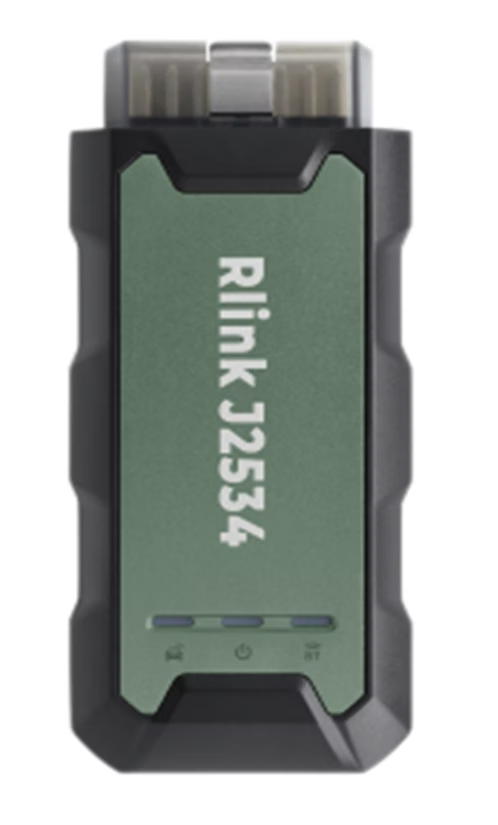
GPT Maps names the TOPDON RLink Lite J2534 as its preferred platform. Its listed features include:
Compatibility with most purchased OEM J2534 software
Support for modern protocols, including DoIP and CAN FD
USB, Ethernet, and Wi-Fi connectivity
Built-in driver management
The RLink Lite does not include OEM software, manufacturer subscriptions, licensing, or security access. Those costs are separate unless stated in a written offer.
What Connection Options Are Available?
Shops have a few ways to connect, depending on equipment and the job:
TOPDON RLink Lite J2534: GPT Maps' preferred option, especially for shops that want a repeatable setup for future jobs.
Orange Sync RPS: Another option for supported jobs. GPT Maps confirms after reviewing the vehicle and procedure whether it is the right fit.
A J2534 device you already own: It may work, depending on the interface, computer, OEM application, vehicle, and procedure.
Autel Remote Expert: Available only for select vehicles and procedures, and only if the shop has a compatible Autel device, an active subscription, and platform access. GPT Maps does not prefer this route because performance can vary.
What Does Your Shop Need for a Successful Session?
Preparation causes or prevents most failed sessions. Before booking, check that you have:
A compatible Windows computer with administrative access
A strong, stable internet connection
The approved J2534 or remote connection device, with current drivers
A stable programming power supply or battery maintainer
The correct replacement part, already installed
All repairs and diagnostics finished
Keys and security documentation, when the job requires them
A technician at the vehicle for the entire session
Do not program with a weak battery, unstable voltage, shaky internet, or an unresolved communication fault. Losing power or communication mid-procedure can damage or disable a module.
What Remote Programming Can't Do
Remote programming completes a supported software step. It does not diagnose or repair the vehicle. It cannot fix:
Mechanical failures
Wiring or connector problems
Network communication faults
Incorrect or defective modules
Internal transmission failures
Low-voltage conditions
Manufacturer security restrictions
Jobs requiring unsupported software or equipment
Your shop still owns the diagnosis. Programming only makes sense once you've confirmed the module needs it.

Can You Program a Used Module Remotely?
Sometimes. Many manufacturers restrict used-module programming or require extra setup, cloning, or security steps. Send the VIN and module information before you buy or install the part. A quick compatibility check costs far less than a wrong module sitting in the vehicle.
How Much Does Remote Programming Cost?
Pricing varies by vehicle, procedure, and software, so no single number applies. Here is what GPT Maps' service terms say about how fees work:
A scheduled remote session is a reserved technical appointment and is billed regardless of outcome. That covers sessions that can't be completed because of vehicle condition, wrong parts, communication failures, unsupported equipment, or missing information.
A connection fee may apply if the technician connects but finds no update available or required.
Manufacturer subscriptions, software access, calibration files, licensing, and security access may cost extra.
These terms can change, so confirm current pricing and policies with GPT Maps before scheduling.
Why Remote Programming Makes Sense for Independent Shops
Remote programming keeps the vehicle where it is. That avoids towing and the delay of sending a car to another facility just for the last software step. A shop that owns a J2534 device can also reuse it for future supported jobs.
The tradeoff is preparation. Remote service depends on your shop's laptop, power supply, internet, and technician. A shop that prepares well will usually have a smoother session.
Tips to Avoid a Wasted Appointment
Send the complete VIN and part number up front.
Share scan reports and photos of the module label if asked.
Connect a battery maintainer, not just a charger, and confirm stable voltage.
Test the internet connection and laptop the day before.
Install and update drivers and software before the session.
Fix known communication or wiring problems first.
Keep a technician at the vehicle from start to finish.
Frequently Asked Questions
What is a remote ECU programming service?
It is a service where a specialist connects over the internet to a vehicle in your shop and performs supported module programming, calibration updates, or setup procedures. Your shop provides the interface hardware, laptop, and a technician on site.
Is remote ECU programming the same as ECU tuning?
No. Programming here means OEM-supported software, calibration, and configuration work. Tuning usually means changing calibration for performance or economy, which is a different service.
Can every vehicle be programmed remotely?
No. Coverage depends on the vehicle, module, replacement part, procedure, available OEM software, security requirements, and connection equipment. Check compatibility before scheduling.
Do I need to buy a J2534 device?
Not always. A compatible device you already own may work. Shops wanting a dependable long-term setup may choose a device such as the TOPDON RLink Lite. GPT Maps verifies equipment before scheduling when possible.
Does the shop need a technician at the vehicle?
Yes. A technician needs to cycle the ignition, operate the scan tool, confirm warning messages, and follow the specialist's instructions.
What happens if no update is available?
If the specialist connects and finds no update or procedure available, a connection fee may still apply.
Can remote programming fix a no-start or communication problem?
Only if the cause is a supported programming or setup issue. It can't fix wiring faults, mechanical failures, defective modules, or low-voltage problems. Diagnose first.
Before You Book
A remote ECU programming service works best when the job is diagnosed, the part is correct, and the shop is prepared. Send the vehicle details and your current equipment list, and the team can confirm compatibility and recommend a connection option. Start at the GPT Maps remote programming page.


Comments